
7 OpenRouter Features Every AI Developer Needs to Know
How to access a very wide selection of 500+ LLMs in an optimal way (performance, cost, resilience) across multiple providers with minimal effort

Introduction
In my agentic developments, I need access to a large selection of models to choose the righ one for my project. The “one-size fits all” doesn’t work (yet ?) in the AI and agentic world: high quality requires most suited models. The optimal models vary on different projects
Managing multiple Large Language Model (LLM) provider APIs is a common source of friction for developers. Each platform comes with its own authentication methods, complex pricing models, and unique API specifications, forcing them to build brittle, provider-locked applications that are vulnerable to single-point-of-failure outages and prevent rapid innovation. OpenRouter solves this by offering a unified interface to the entire ecosystem of AI models.
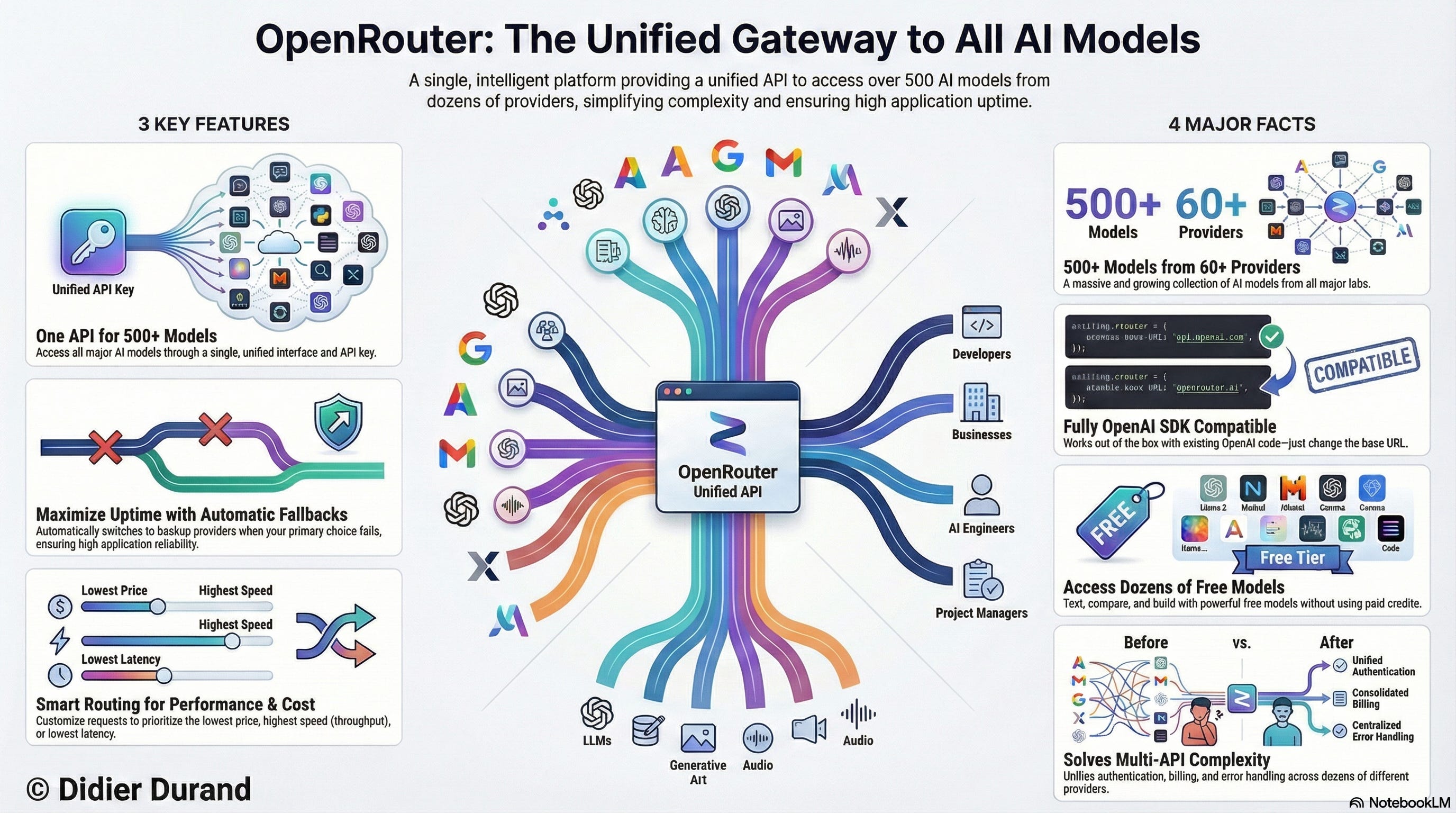
This post uncovers 7 of its most powerful—and sometimes overlooked—features that can enhance the reliability of your applications, control costs, and de-risk your AI roadmap.
1. It’s a Unified API with Drop-in OpenAI Compatibility
OpenRouter’s core value is providing a single API endpoint and a single API key to access over 500+ models from more than 60+ Active Providers. This eliminates the need to manage separate accounts, keys, and billing for each service.
The platform’s most significant advantage is its seamless integration with existing codebases built on the OpenAI SDK. To switch from OpenAI to OpenRouter, developers only need to make two small changes: update the base_url to “https://openrouter.ai/api/v1” and provide their OpenRouter API key.
To specify which model to use, you simply adopt the provider/model-name format, such as google/gemini-2.5-pro. to reach this version of Gemini served by Google. This simple, powerful abstraction gives you immediate access to a vast catalog of models without refactoring your application logic, effectively eliminating vendor lock-in.
2. You Can Access and Test a Massive Roster of Models for Free
OpenRouter offers a wide selection of free models, providing a significant advantage for developers who need to experiment and build proofs-of-concept without incurring costs.
This feature is indispensable for running zero-cost model bake-offs to empirically determine the best model for a specific task before committing resources. For example, a developer can feed the same HTML or PHP content to multiple free models directly within the web chat interface to evaluate and compare their parsing capabilities side-by-side.
Though, free models come with rate limits. New users are limited to 50 requests per day, which increases to 1000 requests per day after purchasing at least 10 credits.
3. Build Unbreakable Apps with Intelligent Routing and Automatic Fallbacks
OpenRouter includes a sophisticated system designed to maximize uptime and reliability for your applications. The platform continuously monitors the health of all providers, tracking key metrics like response times, error rates, and overall availability in real-time.
By default, OpenRouter uses a price-based load balancing strategy for routing. It first filters for providers that have been stable within the last 30 seconds. From that reliable pool, it then load-balances requests toward the lowest-cost options.
The platform’s key reliability feature is model fallbacks. A developer can specify a primary model and a list of backup models for any given request. If the primary choice fails—due to provider downtime, rate limits, or another error—OpenRouter automatically retries the request with the alternative models in the specified order.
This is a critical capability for production applications. Without it, developers would need to build their own complex resilience logic with custom health checks, exponential backoff, and circuit breakers for every single API integration. OpenRouter abstracts this entire engineering challenge into a simple fallback array, insulating applications from single-provider outages and ensuring a consistent user experience.
4. Fine-Tune Routing Based on Real-Time Performance Metrics
Beyond its default strategy, OpenRouter offers advanced routing controls that allow developers to optimize their price-to-performance ratio on every call. You can explicitly sort providers not just by "price", but also by "throughput" (tokens per second) or "latency" (response time).
To go even deeper, you can set performance thresholds using preferred_min_throughput and preferred_max_latency. These parameters filter providers based on percentile statistics (p50, p75, p90, p99) calculated over a rolling 5-minute window.
For example, a developer could configure a request to find the cheapest model that meets a strict p90 latency of under 3 seconds. This allows you to enforce a performance Service Level Objective (SLO) directly in your API call. A p90 latency of 3 seconds guarantees that 9 out of 10 user requests will complete in under 3 seconds, protecting your user experience from worst-case performance.
An especially powerful tool is the partition: "none" setting. The default behavior asks, “Try all options for Model A, then try Model B.” In contrast, partition: "none" asks a more powerful question: “From this entire pool of models, what is the absolute fastest (or highest throughput) endpoint available right now?” This strategic shift is ideal for scenarios where response speed is more critical than the specific model used.
5. Enforce Strict, Per-Request Data Privacy Policies
While individual providers maintain their own data policies, OpenRouter gives developers powerful tools to control where their application’s data is sent. You can filter providers based on their data handling policies at both the account level and, more granularly, on a per-request basis.
To ensure privacy for a specific call, you can include the data_collection: "deny" parameter in your request. This action restricts routing to only those providers that have a policy of not collecting user data.
For an even higher level of assurance, the zdr: true parameter enforces a Zero Data Retention (ZDR) policy. When this is set, a request will only be routed to endpoints that are obligated not to retain prompt or completion data. In essence, data_collection filters based on a provider’s stated policy, while zdr filters based on a stricter, often contractual, Zero Data Retention guarantee.
For enterprise customers, OpenRouter also offers EU in-region routing to ensure data residency and processing remain within the European Union.
6. Get Predictable Data with Structured Outputs
A common challenge in AI development is parsing unpredictable, free-form text from LLM responses. OpenRouter’s Structured Outputs feature solves this by forcing a model to return a guaranteed, valid JSON object that conforms to a schema you define.
By including the response_format parameter with a type of "json_schema", you can specify the exact structure of the desired output. For example, in a sentiment analysis task, you could define a schema with two required properties:
{
  "type": "object",
  "properties": {
    "sentiment": {
      "type": "string",
      "enum": ["positive", "negative", "neutral"]
    },
    "confidence": {
      "type": "number"
    }
  },
  "required": ["sentiment", "confidence"]
}
This forces the model to return a clean, machine-readable JSON object instead of a conversational sentence.
{
  "sentiment": "negative",
  "confidence": 0.98
}
This feature eliminates parsing errors, dramatically simplifies application code, and makes AI-powered workflows far more reliable for any task requiring consistent data extraction.
7. Natively Process Images and PDFs for Multimodal Analysis
OpenRouter extends its unified API to multimodal inputs, allowing you to send images and PDF documents along with your text prompts.
A crucial and non-obvious benefit is its universal compatibility. As the documentation notes, “Even if a model doesn’t natively support PDFs or images, OpenRouter internally parses these files and passes the content to the model.”
This abstraction is incredibly powerful because it future-proofs your code. You can write one piece of logic to handle PDF analysis, and it will work seamlessly whether the underlying model is a native multimodal powerhouse like claude-3-5-sonnet or a powerful text-only model. This decouples your application logic from the specific capabilities of any single model.
Files can be included in a request’s extra_body via the attachments parameter using either a URL or a base64-encoded string. This capability enables a wide range of practical use cases, such as asking questions about a chart in a screenshot, extracting key findings from a research paper PDF, or analyzing a financial report.
Conclusion
OpenRouter is far more than a simple API aggregator. It is a comprehensive development platform equipped with deep features for ensuring reliability, tuning performance, controlling data privacy, and enabling advanced workflows. By unifying access to the world’s models while providing robust tools for routing and resilience, it empowers developers to build more sophisticated and dependable AI applications.
Thanks to its “easy-to implement sophistication” (are you ok with this oxymoron of mine ? 😉 ) , I nowadays use OpenRouter as model provider for the very vast majority of my developments. I also implement vLLM on RunPod in some more specific use cases. I’ll come back on that in a later post.
Given these powerful tools for control and resilience, which long-standing challenge in your AI application could you now solve?
Final note: As ex-Amazonian, OpenRouter’s LLM brokering service model strongly reminds me of Amazon Flywheel with selection as one of its key aspects