
Opencode, the OSS coding agent: 80,000+ GitHub stars for very good reasons!
The differentiating aspects of the leading OSS vibe coding agent
Why Gazillions of Developers Are Ditching AI Code Assistants for Terminal-First Tools
Every developer knows the feeling: you’re coding, you need help, so you switch to your browser, open an AI tool, and context switch away from your flow. We’ve been sold the idea that AI coding assistants should be web-based, feature-rich applications with complex UIs. But a growing movement is challenging this assumption, and it’s gaining momentum fast.
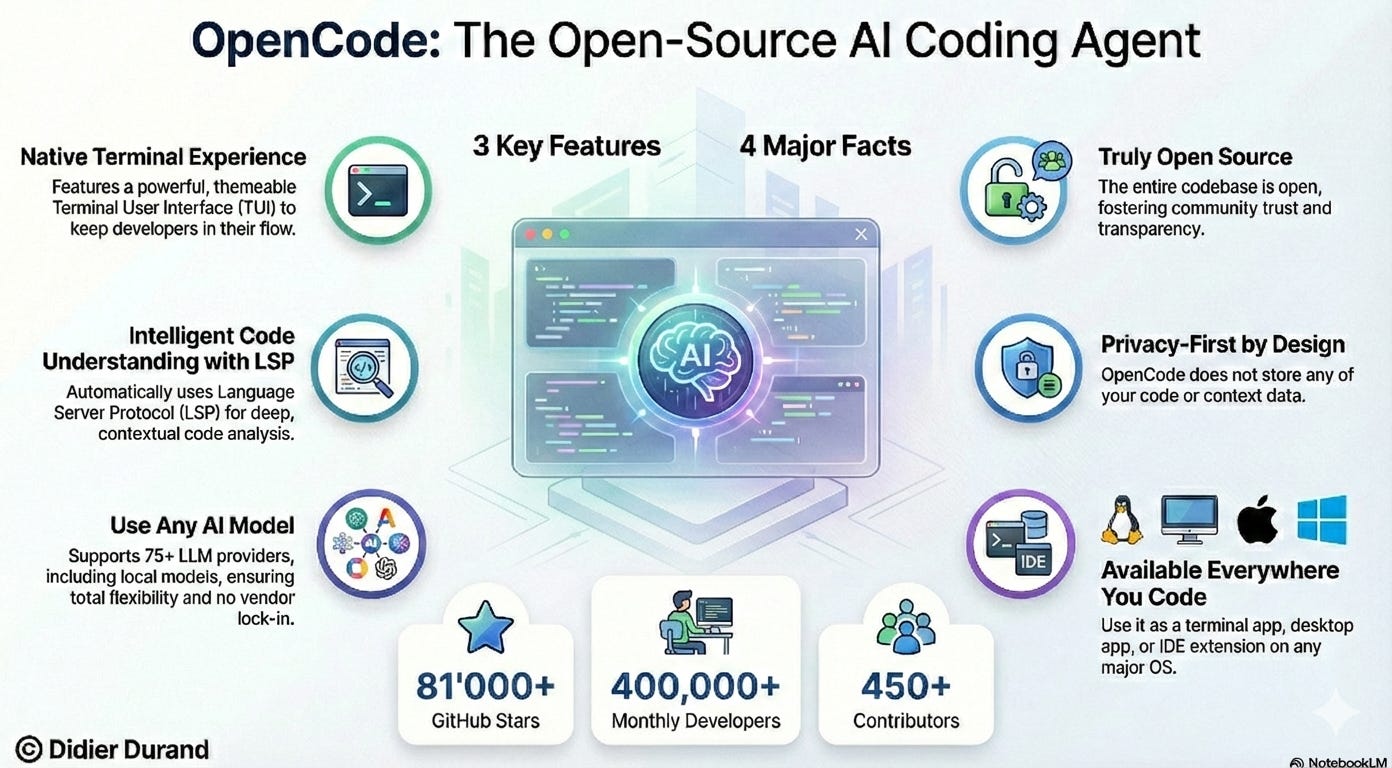
The surge of interest in terminal-first AI coding agents—led by OpenCode’s, aka “the open-source coding agent”, remarkable 80,000+ GitHub stars—suggests we’ve been initially thinking about AI-powered developer tools all wrong.
Below are some counter-intuitive insights about why developers are returning to the terminal AI-powered coding tools like Opencode.
The Terminal as a First-Class AI Interface
When was the last time you saw a modern developer tool that prioritized terminal interface over graphical UI? OpenCode wasn’t just built for the terminal—it was built by neovim users and the creators of terminal.shop (https://terminal.shop), a team obsessed with pushing the limits of what’s possible in terminal interfaces.
This terminal-first philosophy isn’t nostalgia. It’s recognition that the terminal is already where developers spend most of their time, where their muscle memory lives, and where context switching is most expensive. A TUI (Terminal User Interface) for AI coding doesn’t just feel native—it eliminates the friction of leaving your development environment.
The project documentation demonstrates this commitment. This isn’t about being retro—it’s about meeting developers exactly where they work.
Provider Agnosticism as the New Competitive Advantage
Most AI coding tools lock you into a single provider: Anthropic’s Claude, OpenAI’s GPT, or Google’s models. OpenCode takes a radically different approach: it’s completely provider-agnostic.
> “Although we recommend the models we provide through OpenCode Zen; OpenCode can be used with Claude, OpenAI, Google or even local models.” ^2
This might seem like a technical detail, but it’s actually a profound insight about the AI landscape. As one LLM leaps ahead of another, or as new specialized models emerge, being tied to a single provider becomes a liability. Provider agnosticism isn’t just flexible—it’s forward-looking. The OpenCode team understands that “as models evolve the gaps between them will close and pricing will drop so being provider-agnostic is important.”
This architectural choice respects the reality that the best AI model today might not be the best one six months from now, and developers shouldn’t have to rebuild their workflows to switch providers.
The Build vs. Plan Agent Architecture
Perhaps the most surprising feature is OpenCode’s dual-agent system. You can switch between two agents with a single keystroke:
- build: Full access agent for development work (default)
- plan: Read-only agent for analysis and code exploration
The plan agent denies file edits by default and asks permission before running bash commands, making it ideal for exploring unfamiliar codebases or planning changes before execution.
This is a relevant solution to one of AI coding’s biggest problems: trust. Instead of giving an AI blanket permission to modify your codebase, you can first have it create a plan. You describe what you want, the plan agent proposes how to implement it, you review and iterate, then switch to build mode to execute.
> “You want to give OpenCode enough details to understand what you want. It helps to talk to it like you are talking to a junior developer on your team.”
This human-in-the-loop approach respects that AI, like junior developers, needs guidance and oversight—not blind trust.
Client/Server Architecture Enables Remote AI Development
One of OpenCode’s most innovative features is its client/server architecture. The terminal interface you interact with is just one possible frontend.
This for example can allow OpenCode to run on your computer, while you can drive it remotely from a mobile app. Meaning that the TUI frontend is just one of the possible clients.”
This architectural choice enables scenarios that haven’t been fully explored yet. Imagine: fixing bugs from your phone during your commute, or pair programming across devices where one person uses the desktop app while another uses a terminal interface. The decoupling of AI processing from user interface opens up entirely new possibilities for when and where we can be productive.
AGENTS.md: The AI-Readable Project Manifest
When you initialize OpenCode in a project with /init, it creates an AGENTS.md file in your project root—and you’re encouraged to commit this file to Git. ^7
This is a fascinating convention: a documentation file specifically designed for AI consumption. AGENTS.md helps the AI understand your project structure and coding patterns, creating a form of institutional memory that persists across sessions and can be versioned alongside your code.
This represents a shift in how we think about documentation. Instead of documentation being solely for humans, we now have files designed primarily for AI consumption—but still readable by humans. As AI tools become more central to development, these AI-readable configuration files will become part of the standard software engineering toolkit.
Image-Driven Development in the Terminal
Here’s something that seems counter-intuitive: you can drag and drop images into your terminal, and OpenCode will analyze them as part of your conversation. ^8
The documentation shows this in practice: you can show the AI a screenshot of a design you want implemented, and it will use that as reference for building your feature. This capability—typically associated with GUI applications—works seamlessly in a terminal interface.
This demonstrates that terminal interfaces aren’t limited to text-only interactions. Modern terminals support rich media, and OpenCode leverages this to enable workflows like showing design mockups, error screenshots, or reference interfaces—all without leaving your development environment.
The YOLO Installation Philosophy
Perhaps the most telling detail is the installation command itself:
curl -fsSL https://opencode.ai/install | bash
That’s it. The documentation literally labels this approach as “#YOLO.”
This playful naming hides a serious insight: developer tools should be trivial to try. The friction of installation—including learning complex configuration procedures or managing dependencies—is often what prevents adoption of new tools. By making installation as simple as running a curl command, OpenCode respects that developers are busy and have limited patience for setup overhead.
80,000+ Stars and Growing
The GitHub repository shows 80.9k stars and 7.2k forks as of January 2026, with 614 contributors and 672 releases. This isn’t just popular—it’s one of the most widely-adopted developer tools in recent memory.
This level of community engagement suggests that OpenCode has hit a nerve. Developers are hungry for AI coding tools that respect their existing workflows, that don’t lock them into ecosystems, and that prioritize power over simplicity.
Open Source at the heart
OpenCode embodies the open source AI philosophy in several key ways:
Open Source Foundation: OpenCode is 100% open source enabling collaborative development unlike closed AI coding tools that are black boxes controlled by corporations.
Provider Flexibility & No Lock-in: Unlike proprietary tools (Claude Code, GitHub Copilot) that force you into a single provider’s ecosystem, OpenCode works with any LLM—Claude, OpenAI, Google, or local models—giving you freedom of choice as the AI landscape evolves.
Increased Innovation Speed: With 672 releases and 7.2k forks, OpenCode demonstrates how open collaboration accelerates development. Anyone can examine, modify, and improve the code, building on previous work rather than starting from scratch.
Democratized Access: OpenCode lowers barriers through simple installation (curl | bash) and provider-agnostic architecture, making AI coding accessible to any developer regardless of their preferred AI provider or budget.
Transparency & Trust: As open source software, OpenCode’s internals are fully visible and auditable. You can verify how it processes your code and data, unlike proprietary tools where you must trust a vendor’s claims about security and privacy.
Vibrant Ecosystem: OpenCode supports multiple interfaces (terminal, desktop, IDE, web), extensive customization (themes, keybinds, plugins), and a client/server architecture that enables diverse use cases—all possible because of its open, extensible design.
Cost Efficiency: By supporting local models and avoiding vendor lock-in, OpenCode gives developers control over their AI infrastructure costs, aligning with the move toward smaller, purpose-built models rather than expensive monolithic LLMs
The Future Is Hybrid
The rise of terminal-first AI coding agents doesn’t mean web-based tools will disappear. But it does suggest that the future of developer tools is hybrid: meeting developers where they are, whether that’s a terminal, a desktop app, an IDE extension, or a web interface.
OpenCode itself is available as a terminal interface, a desktop app, and an IDE extension—recognizing that different developers prefer different environments for different tasks.
The most successful tools will be those that acknowledge that developers have diverse preferences and workflows, not those that try to force everyone into the same way of working.
Conclusion
As AI continues to transform software development, the tools that will win aren’t necessarily the ones with the flashiest interfaces or the most features. They’ll be the ones that understand what developers actually need: seamless integration with existing workflows, respect for their expertise, and the flexibility to adapt as technology evolves.
The question isn’t whether AI will become part of every developer’s toolkit—it already has. The question is: will your AI tools serve you, or will you serve them?